HellSpin Mobile Website, Browser Play and PWA
 Available in AU
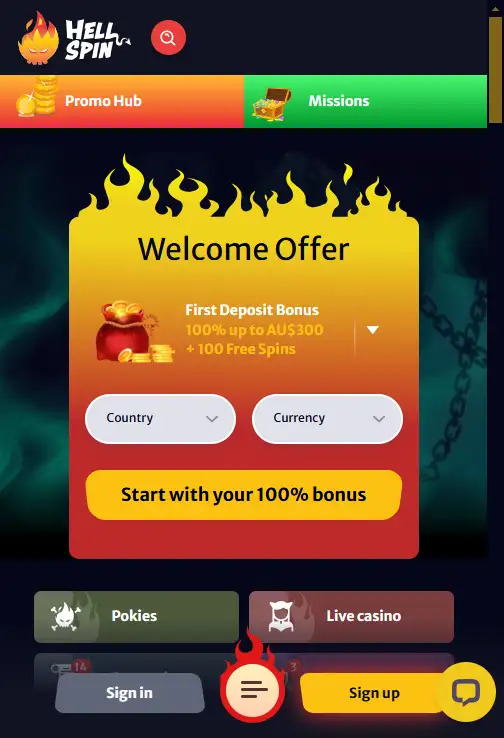
HellSpin runs a responsive casino website on iOS and Android browsers, with slots, live dealer content, account menus and support incorporated into a smaller-screen layout. A PWA-style home-screen shortcut provides another way to present that web experience. The important distinction is how a browser adapts the interface, not whether an icon resembles a downloadable application.
Table of Contents
Finding Games on a Smaller Screen
The HellSpin mobile experience includes casino-lobby navigation and search, with access to the broader selection of slots and live-dealer formats. The platform’s described catalogue spans video slots, live roulette, blackjack and baccarat, along with quicker casino formats. On a handset, the same variety demands a different way of organising information: categories need to be navigable without the wide horizontal space available on a desktop monitor.
A mobile lobby can place game tiles, filters and account functions at different visual levels. Search helps with known game names, while a category route serves someone comparing formats. HellSpin’s mobile menu is described as incorporating the casino lobby, live dealers, a VIP area and customer support. These areas have different jobs; the presence of a menu label should never be mistaken for a special financial benefit or a uniform experience in every game.
Slot games generally devote much of the portrait display to reels, a stake control and feature information. Live dealer games need to accommodate a video stream, betting options and a round timer simultaneously. A phone makes those distinctions more obvious. For a closer account of the underlying formats, see the HellSpin game catalogue and live-table breakdown. The way a title fits on screen does not change its paytable or the risk associated with repeated stakes.
Navigation and visual hierarchy
On a narrow display, a useful hierarchy places the current game, stake and key actions ahead of decorative panels. A search result is effective only if the game name remains legible, while a live-table selection needs enough context to distinguish roulette from blackjack or baccarat. Long lists of small thumbnails can require frequent scrolling, particularly when a player’s attention is already divided between the screen and their surroundings.
- Slots: compact controls and a clear view of the active stake matter more than decorative animation.
- Live tables: readable decision windows and streamed dealer activity compete for limited display space.
- Crash and other quick rounds: pace can make elapsed time feel short, even as the number of stakes accumulates.
- Catalogue search: the value lies in locating a title without losing track of which category it belongs to.
These are differences between game types, not a claim that every HellSpin title has the same phone controls. Individual suppliers build their own game interfaces, so a responsive lobby can still contain games that behave differently when rotated, resized or interrupted. A good mobile reading of the product therefore separates site navigation from game-level controls.
Touch Controls, Video Streams and Device Conditions
The responsive website brings casino content to a touch interface. That changes the physical demands of using it: a thumb can obscure a small icon, a long press may behave differently from a mouse click, and the on-screen keyboard can hide part of a form. A control that looks prominent on a desktop screen may occupy a much smaller area when several panels compete for the same phone display.
The contrast is sharpest with live dealer content. A stream requires stable delivery while the game also tracks time-sensitive decisions. Network congestion, changing signal strength and transitions between Wi-Fi and mobile data can affect what appears on the device. A video that continues to display does not itself establish that a wager or decision reached the service before the round closed. The game’s own transaction history and rules are more meaningful than assumptions based on animation alone.
For ordinary web use, battery-saving settings, screen dimming and interruptions from incoming calls can change a mobile session. Those factors are not unique to HellSpin. They matter because a small screen may make it harder to notice a message about the state of a round. A brief interruption should be treated as a reason to distinguish a visible display from a recorded outcome, rather than to repeat a financial action on assumption.
Session comfort and attention
Long periods of interaction on a phone can encourage a different pace from a desktop session. The screen is close to the user, often held with one hand, and a sequence of small actions may appear less consequential than an equivalent series of wagers shown in a broad desktop transaction panel. The total amount put at risk depends on the accumulated stakes, however, not on the size of the device.
- Legibility: small type and condensed controls can hide qualifiers in a game description.
- Connection quality: a stalled stream may be a display problem rather than evidence that a round did not take place.
- Interruptions: calls, alerts and battery warnings can distract from an active screen.
- Duration: a convenient handheld format can make it harder to notice how long a continuous session has lasted.
The safer interpretation is to regard mobile convenience as an interface characteristic, not a reduction in gambling risk. A smaller or faster display does not change the mathematical properties of a title. Gambling can cause financial harm regardless of device type, and the responsiveness of a game should not be treated as an indicator of its suitability.
Account Menus and Support Within the Mobile Site
HellSpin’s mobile navigation includes account-related areas, VIP-menu access and support. Its web chat is described as available 24 hours a day, seven days a week. The same platform is associated with several interface languages, including English. In practice, a support window on a mobile screen has to share space with the browser’s keyboard and the conversation history, so a discussion can feel more compressed than on a laptop.
The account side of the product also connects to identity checks. HellSpin is described as requiring verification in some withdrawal circumstances; that is an account and payment-control issue, not a feature made easier or unnecessary by the use of a phone. A mobile layout may be convenient for viewing a profile, but the accuracy of submitted personal information and the treatment of a dispute are separate matters.
For an existing customer trying to understand a problem, the HellSpin account, verification and support analysis explains how help channels and complaint records fit together. It also addresses why a chat reply, an account message and a recorded financial transaction need to be considered separately. Phone screens can show all of these in close succession without making them interchangeable.
| Area | HellSpin feature | Practical significance |
|---|---|---|
| Customer support | Web chat described as operating 24/7 | A conversation records the service response; it does not itself prove a transaction was settled |
| Account navigation | Profile and account menus in the responsive website | Personal details and account information have a different purpose from the game lobby |
| VIP area | VIP programme represented in the site navigation | A programme label does not establish any particular cashback rate or tier entitlement |
| Verification | Identity checks associated with withdrawal review | Verification is an account condition, irrespective of the size of the display |
A small display also changes the handling of personal information. Screen previews in a public place, saved screenshots and notification banners can expose names or account details to other people nearby. Those are device-level privacy concerns rather than evidence of a particular HellSpin security failure. The distinction matters when interpreting an account issue: the website’s interface, the browser and the operating system each have different responsibilities.
Where a complaint involves missing context, dates, transaction identifiers and copies of service correspondence help establish what was communicated. That is record-keeping for an existing issue, not a reason to create an account or initiate a new payment. On a phone, these items are often distributed across messages, downloads and photo folders, which can make a chronological account harder to reconstruct.
The Responsive Browser Layout
HellSpin’s mobile presentation is primarily browser-based. A responsive layout scales the website around the display available to the browser, allowing the casino lobby and live content to sit inside an ordinary web session on compatible iOS and Android devices. This differs from a native application packaged separately for a mobile operating system. The responsive web experience is a positive description of how the product is delivered; it makes no claim about a store-distributed HellSpin application.
Browser layout has several everyday implications. An address bar may occupy part of the vertical screen, rotation changes the proportions of video and controls, and a page may need to redraw after a connection interruption. Touch targets and navigation menus should remain intelligible when the viewport becomes smaller. A browser session also depends on the device’s ordinary handling of tabs, memory and permissions.
It is useful to distinguish the site shell from the game content loaded inside it. The shell can rearrange its navigation at mobile width while an individual game’s interface remains supplier-defined. Even two similarly named blackjack tables may rely on different components or interaction patterns. A responsive landing view therefore does not establish that every embedded game has identical orientation, control spacing or stream behaviour.
| Mobile web | PWA-style shortcut | Native app — general comparison |
|---|---|---|
| Runs in a mobile browser | Opens a web experience from a home-screen entry | Uses an operating-system application package |
| Browser provides address and tab controls | Presentation can feel closer to a standalone window | Window and navigation are defined by app design |
| Online content depends on the web connection | Online casino content still depends on a connection | Network needs depend on the specific native product |
| HellSpin’s responsive site uses this format | A HellSpin home-screen shortcut has been described | Included only to explain the software category |
The comparison is about delivery technology, not a claim that HellSpin supplies all three products. A shortcut is still connected to the website that supplies the content, while a native application may have its own package, permissions and update cycle. Similar-looking icons on a phone can conceal these differences; the visible presentation alone cannot determine which underlying delivery model is in use.
For users reviewing the general design, the browser format avoids making an app-store listing the definition of mobile support. The mobile site and its PWA-style presentation are the relevant reported forms here. Game outcomes and account conditions are separate from interface characteristics and do not change with screen size.
What the PWA-Style Shortcut Changes
The HellSpin mobile experience has been described as offering a PWA-style home-screen shortcut. A progressive web application is a web-based presentation that can resemble a standalone app in its window and launch behaviour. A home-screen entry is therefore a convenience for displaying the web interface, not a separate source of casino terms, account rights or game outcomes.
That distinction is useful because a shortcut icon can give the impression of a wholly independent product. In a web-based model, the casino pages and their content are still delivered through web technology. The browser engine, network connection and website session remain relevant. Individual PWA features vary widely across implementations, so the phrase alone should not be read as a promise of offline gaming, push alerts or any specific operating-system integration.
On a phone, the PWA-like presentation may devote more visible space to the content by changing how much browser chrome appears. The effective benefit is a cleaner view of menus and game panels. The trade-off is that familiar browser cues can be less conspicuous, making it worth distinguishing the content of a page from the device wrapper around it. Those are general interface considerations, not a description of special permissions claimed for HellSpin.
What remains part of the website
Both the browser view and a shortcut-driven view remain linked to the same broad product: a HellSpin website with a casino lobby, live dealer content, account navigation and customer support. The user-interface format does not create a separate set of payout conditions or remove identity verification. In particular, installing or opening a shortcut would not change the status of a financial transaction already recorded by the platform.
Data exposure also needs to be understood on two levels. The phone controls which local notifications and screen previews appear, while the website determines its own session and account handling. Whether one uses a browser tab or a home-screen window, it is important not to confuse a visually app-like presentation with a guarantee about how account data is treated.
The wider picture is a browser-first mobile service rather than a product defined by a download. That framing is consistent with HellSpin’s responsive interface, live categories and mobile support areas. It also explains why evaluating a phone experience requires more than judging the icon: connection behaviour, readability and the treatment of account messages have direct consequences for how a session is understood.
Questions About HellSpin on Phones
Does HellSpin have a mobile browser site?
Yes. HellSpin uses a responsive mobile website for iOS and Android browsers, with casino categories, game navigation and live dealer content.
What is the HellSpin PWA-style experience?
A PWA-style shortcut presents the mobile website through a home-screen entry. It remains web-based and depends on the browser and network for its online content.
Are live dealer games part of the mobile experience?
Yes. HellSpin describes live roulette, blackjack, baccarat and related dealer-led formats within its responsive casino offering.
Is HellSpin support available on mobile?
HellSpin lists around-the-clock web chat, and its mobile interface includes support access. Availability of a particular conversation still depends on the service at the time.
Mobile Usability Comes Down to the Browser
HellSpin’s mobile proposition rests on a responsive browser site and a described PWA-style shortcut. Slots, live dealer games, account navigation and web chat are part of the mobile-facing product, while individual supplier interfaces and network conditions shape how those elements behave on screen. The meaningful questions concern readable controls, session continuity and the difference between what the screen shows and what the account or game records.
Mobile access can make a digital product feel more immediate without changing the financial risk of gambling. The shortcut format changes the presentation; it does not change the underlying activity, the importance of identity checks or the need to treat spending and time as cumulative. Seen in that light, the browser is the defining delivery layer, and interface convenience is best understood alongside its limits.